Integrations, exactly as they work today
Every connection on this page is one you can switch on now, described the way it is built. Where a claim rests on code, the file is named under it, and what is missing has its own list at the bottom.
Analysers
Analyser-ready: map analyser test codes to your catalogue and post results as CSV rows or through the API. HL7 and ASTM are not parsed by the hosted service today: analysers that export CSV work now, and a small local bridge for HL7 and ASTM is planned.
How the mapping works
Add the instrument once, then map each code the machine prints to a parameter in your catalogue. The mapping lives with the instrument, so the same analyser behaves the same way at every branch and you edit it without anyone touching a config file.
How results arrive
POST /instruments/:id/ingest takes rows of code and value, either as a CSV body or as JSON. The raw payload is logged for traceability, mapped values are merged into the draft result, and flags and calculated parameters are recomputed by the result engine. Codes it cannot match come back in the response as unmapped, so nothing is silently dropped.
Where HL7 and ASTM fit
Most analysers speak HL7 or ASTM over a serial cable or a socket on the bench. The plan is a small bridge on a computer in the lab that listens to the machine, turns each message into those code and value rows, and posts them. It is not shipped yet. Keeping the protocol work on site is deliberate: the cloud never has to hold a socket open to a machine in your lab, and a broken cable stops one bench, not your reporting. Until then, analysers that export CSV are the path in.
What you still do by hand
Someone still reads the result, verifies it and releases the report. Ingestion fills the entry screen; it does not sign anything.
The ingest endpoint, the code mapping and the unmapped-code response.
Delivery
Reports go out by email, SMS or WhatsApp. You bring your own sender accounts, so the messages come from your lab and the spend is yours to see.
- Email through Brevo
- Transactional email with the PDF attached. Brevo returns a message id, which the delivery log keeps so a bounce can be reconciled later instead of disappearing.
- SMS and WhatsApp through Twilio
- A short message with the report link. WhatsApp sends from your own WhatsApp Business sender, so patients see your lab, and message templates stay under your account.
- Dry run until you connect one
- With no credentials set, delivery runs in console mode: the message is recorded and nothing is sent. You can rehearse the whole flow without spending a rupee or texting a real patient.
The three providers, what each one needs configured, and the dry-run default.
Payments
Two different things are called payments in a lab, and only one of them is an integration.
Your subscription to us
Plan changes open a Dodo Payments checkout, and the webhook it calls back is what activates the plan. You pay monthly, in rupees, and cancelling stops the next renewal rather than locking your records.
Your patients paying you
Bills record the mode the money came in by, cash, card, UPI or a bank transfer, along with part payments and the balance. There is no payment gateway on the bill: you take the money the way you already do and record it, which is why the day book and the dues list add up.
Checkout sessions and the webhook that activates a plan.
Pages your patients open
Two public pages carry the QR codes the lab prints. Neither needs an account, and neither shows a medical result to whoever finds the link.
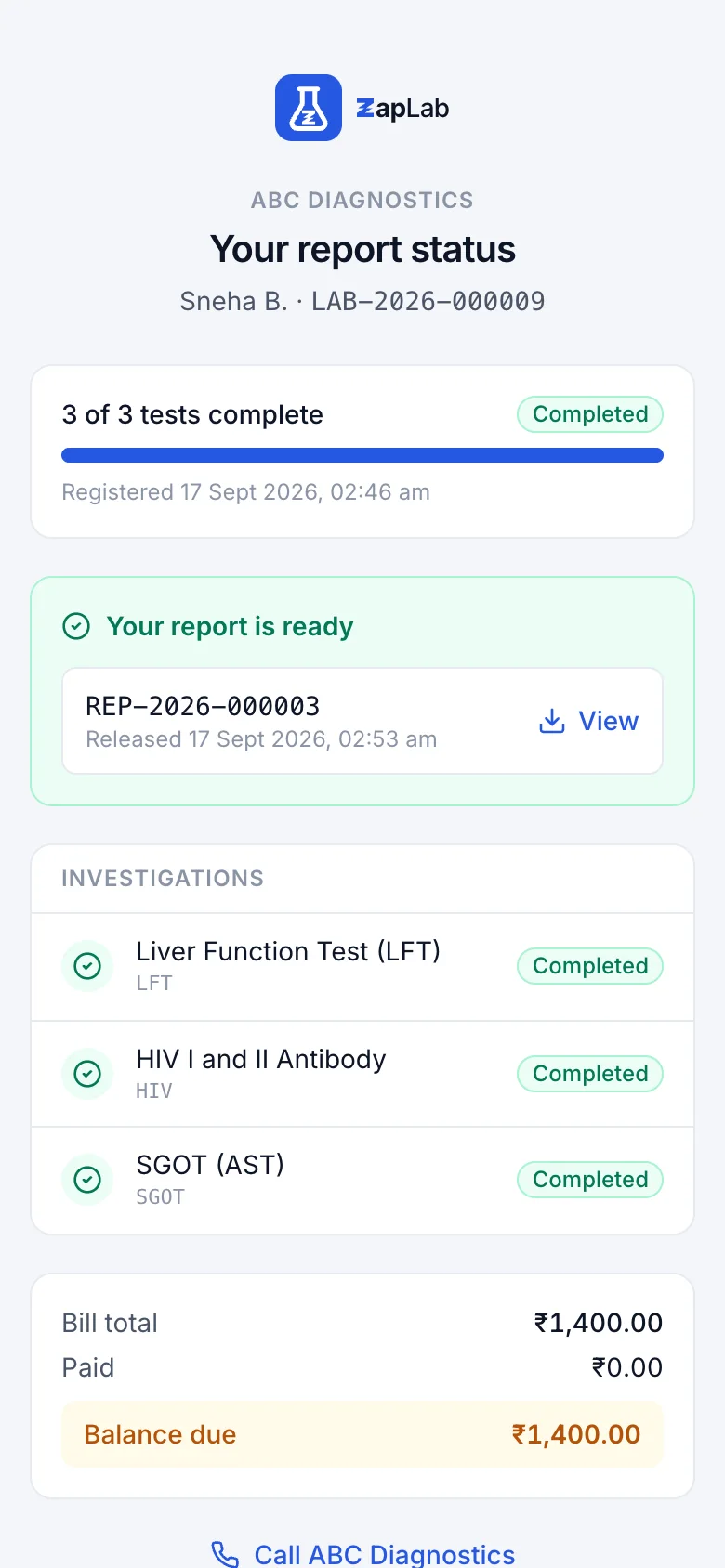
Tracking, from the bill QR
The QR on the bill opens a page showing how many investigations are done and what is still in the lab, with the patient name masked and a button to call the branch. It saves the phone call asking whether the report is ready.
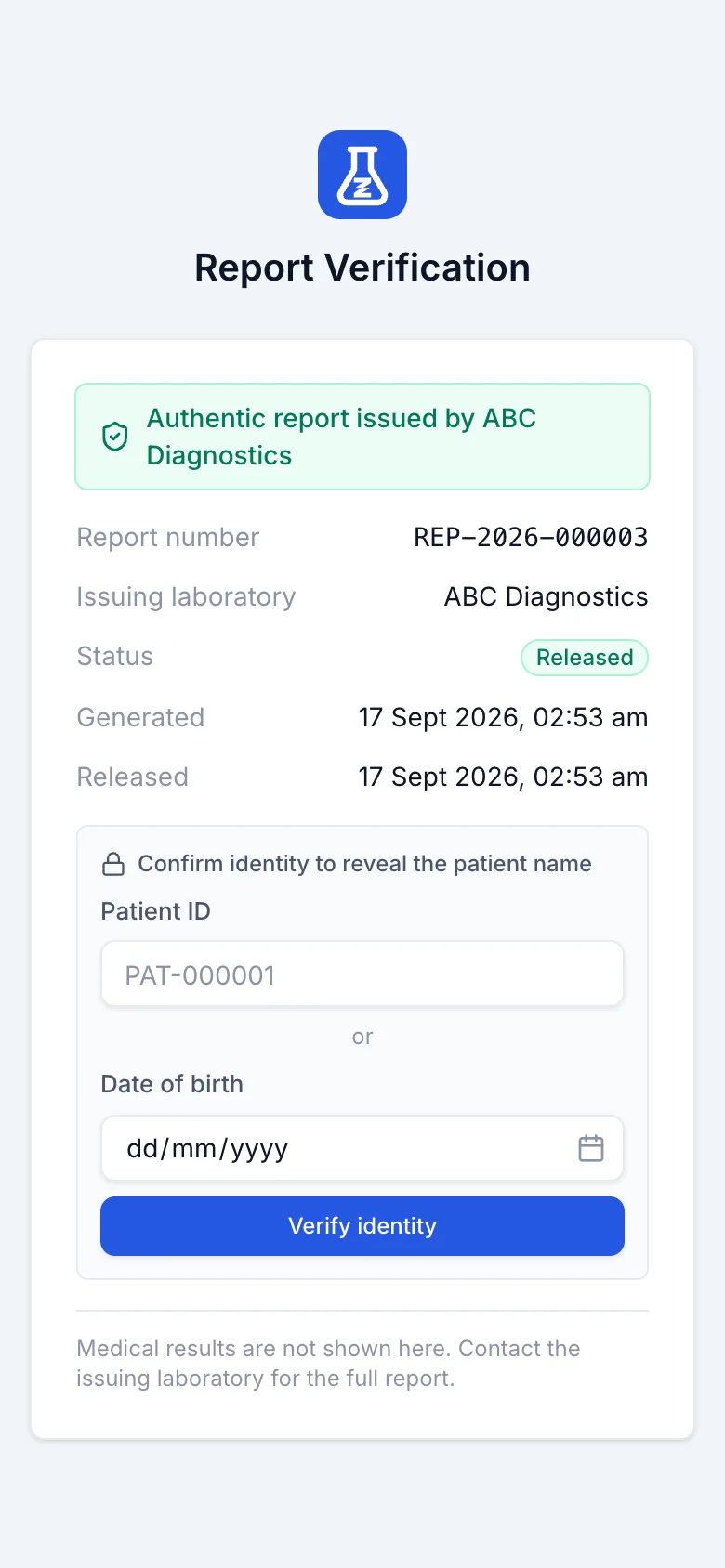
Verification, from the report QR
Every released report carries a QR code that proves the page came from your lab: report number, status and dates. The lab can require a date of birth or a patient code before any identifying detail shows, and results are never printed on it.
Data export
Patients, orders, samples, results, reports and invoices download as CSV from their own list screens, and so do the rate list, the day book and the analytics tables.
The download is the view you are looking at, filters, sorting and visible columns included, so a spreadsheet matches the screen you exported it from. It is also the answer to the question behind most integration requests: the numbers your accountant or your own spreadsheet wants are one button away, with no export licence and nothing to ask us for.
The shared exporter every list screen calls.
Not available yet
If one of these is what you came for, it is better you read it here than find out on a call.
- No HL7 or ASTM listener inside the API itself. That parsing belongs to the bridge on your lab computer, and the bridge is set up with you.
- No self-service API keys for instruments yet. Ingestion runs under a normal user login, so a bridge needs credentials we issue with you.
- No sync with accounting software. Invoices, payments and expenses export to CSV, and that is what you hand your accountant.
- No insurance or TPA claim submission. You can record the payer and the payment mode on the bill, and nothing is filed for you.
- No bidirectional analyser control. The platform reads results; it does not send worklists back to the machine.
Bringing an analyser in? Book a walkthrough and tell us the make and model, and we will show you the mapping screen with your codes in it.
Set up your lab this afternoon.
Create your organisation, add your tests, print the first barcode. If you would rather see it first, ask for a walkthrough.