Patient data, handled the way a lab would want
A lab information system holds some of the most sensitive data there is. This page explains, in plain terms, how the platform protects it and where the responsibilities sit. Claims that rest on code name the file underneath them.
Where your data lives
Indian labs answer to Indian law. The platform is hosted in India on managed cloud infrastructure.
- Hosted in India
- Application, database and stored reports run in India. Patient data is not transferred abroad to run the service.
- Encrypted in transit
- Every connection to the app, the API and the database uses TLS. Reports and files are served over HTTPS only.
- Managed infrastructure
- Databases and storage are managed services with automated backups, so a lost laptop or a failed disk is never a lost record.
One lab cannot see another
Every lab on the platform is a separate tenant. Isolation is enforced in the application on every request, not left to a filter someone might forget.
- Tenant scoping on every query
- The lab a user belongs to comes from their verified login token, never from the request. Every record is read and written within that lab only.
- Validated references
- When a screen refers to another record, such as a branch, a test or a template, the platform checks it belongs to the same lab before it is used.
- Report links that cannot be guessed
- Verification pages use long random tokens and show only what a verifier needs to see.
Derives the lab from the verified token on every request.
The only way a route reads the current lab.
Who can do what
Reception should not release reports and a technician should not change prices. Access is permission-based and checked on the server.
- Roles with fixed ceilings
- Owner, admin, pathologist, technician, reception and more. Each role carries a fixed set of permissions, and no one can grant a role above their own.
- Immediate revocation
- Deactivate a user, change their role or reset a password, and their existing sessions stop working within seconds.
- Rate limiting
- Login, password reset and other sensitive endpoints are rate-limited, so password guessing is slowed to a crawl.
The permission set each role carries.
Checks the permission before the route runs.
Stamps the user so older sessions stop being accepted.
A record of every change
The audit trail is what makes a result defensible. It is written by the platform, not by the user, and it cannot be edited.
- Results and reports
- Entry, verification, release, amendment, print and delivery are logged with the user and the time. A released result is snapshotted so later edits are visible as amendments.
- Logins and settings
- Sign-ins, role changes and configuration edits are logged too, and the log is readable from the settings screen.
- DPDP-ready records
- The Digital Personal Data Protection Act 2023 expects purpose limitation, access control and accountability. The audit trail, the role model and hosting in India are designed to support your obligations as a data fiduciary. Nothing here is certified, and compliance stays your lab’s responsibility; the platform gives you the records to meet it.
What is written, and by whom, for every logged action.
Your data is yours
Nothing is locked in, and the pages your patients see keep working.
- Export from your lists
- Patients, orders, samples, results, reports and invoices download as CSV from their list screens, filters and visible columns included.
- Readable forever
- Downgrading or cancelling never deletes records. Your lab keeps read access to its history on the Free plan.
- Verification stays up
- QR verification pages for released reports keep working as long as the lab exists on the platform, so an old report can still be checked.
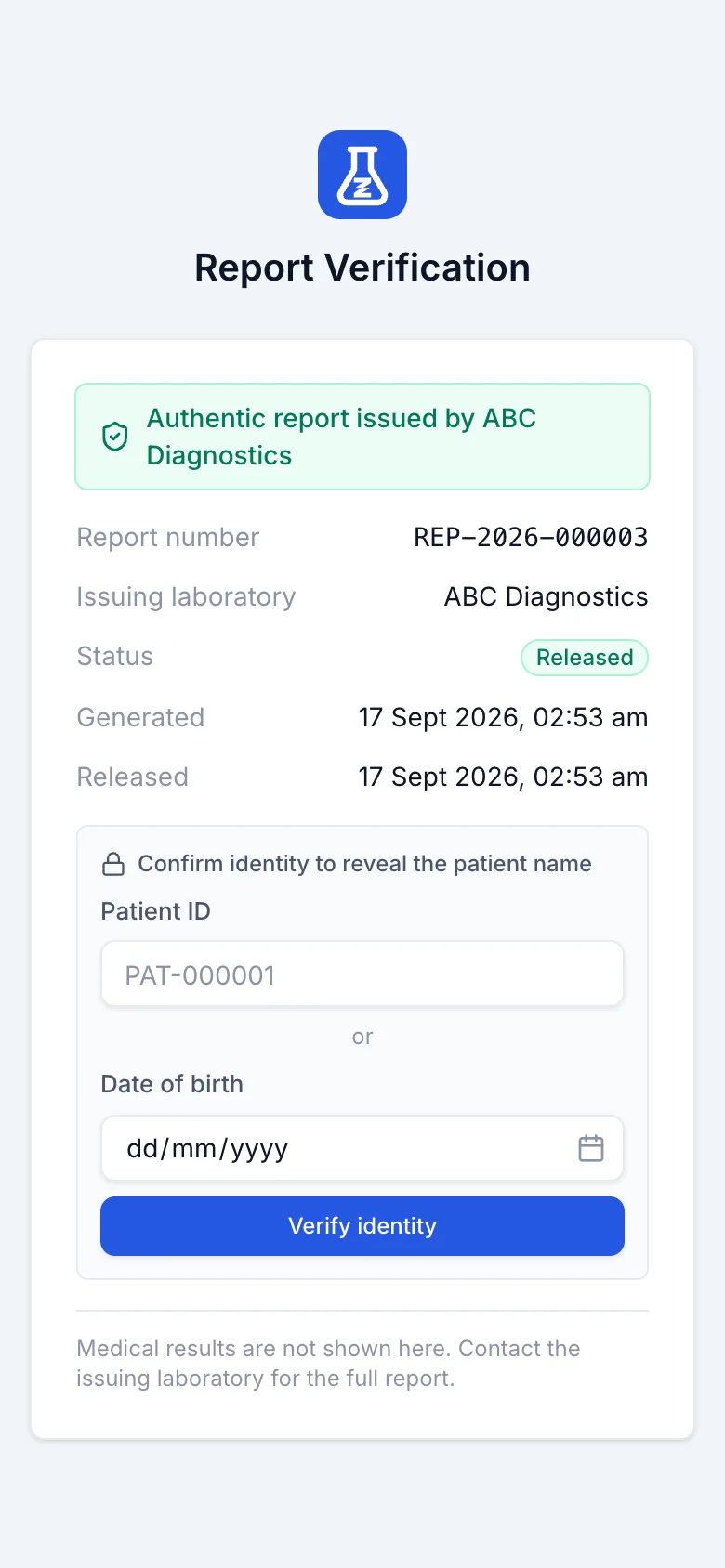
What a stranger with the link sees
The report QR proves the page came from your lab: report number, issuing laboratory, status and dates. Your lab can require a date of birth or a patient code before any identifying detail appears, and the results themselves are never shown here.
The public verification endpoint and its identity challenge.
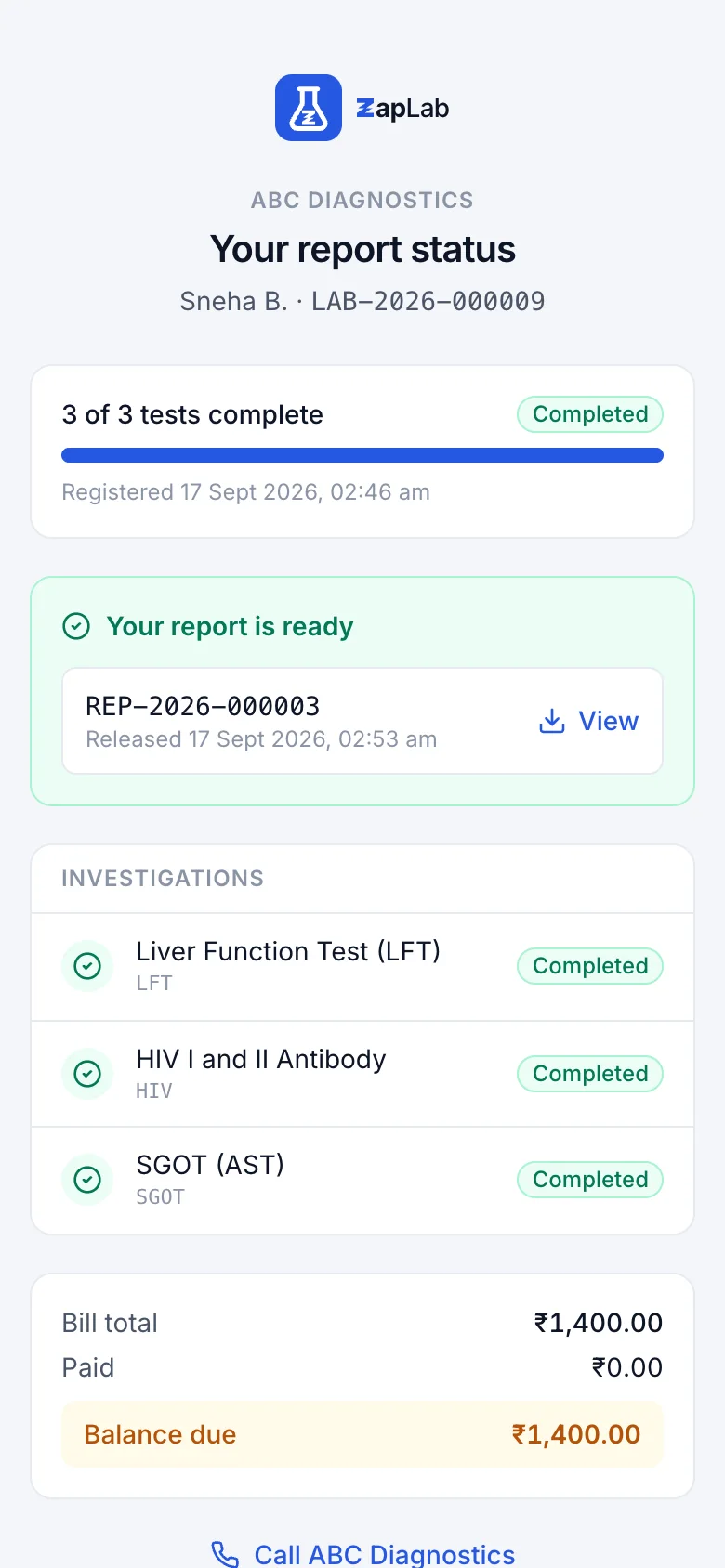
What the bill QR shows
The tracking page answers one question, whether the work is done, with the patient name masked and no values on it. It saves the phone call without putting a medical result behind a guessable link.
The token lookup behind the tracking page.
Set up your lab this afternoon.
Create your organisation, add your tests, print the first barcode. If you would rather see it first, ask for a walkthrough.